
DevOps software testing exists because shipping risky changes at high velocity is expensive.
Research from CISQ estimates the cost of poor software quality in the U.S. at at least $2.41 trillion (2022), including about $1.52 trillion in accumulated technical debt. (it-cisq.org)
That cost goes beyond bugs in production. It includes rework, delayed releases, emergency hotfixes, customer churn, and the opportunity cost of engineering teams firefighting instead of building. DevOps testing cuts into that number by making quality checks a constant throughout the pipeline, not a gate at the end.
Traditional testing models assume a waterfall handoff: developers write code, QA tests it, issues bounce back and forth until someone signs off. DevOps collapses that timeline. When teams deploy multiple times per day, testing can’t be a separate phase. It must be continuous, automated, and integrated into every commit, merge, and deployment stage.
Key takeaways:
- DevOps testing runs continuously throughout the CI/CD pipeline, not as a final gate before release
- Structure test suites in layers: fast unit tests at the base, fewer integration tests in the middle, minimal UI tests at the top
- Fix or delete flaky tests quickly to protect pipeline reliability and team confidence in automation
- Ranorex Studio supports desktop, web, and mobile automation from one IDE, with Jenkins and Azure DevOps integrations and “self-healing” object recognition to reduce test breakage from UI changes (plugins.jenkins.io)
What is DevOps testing?
DevOps testing is continuous quality validation embedded throughout the CI/CD pipeline. Rather than a dedicated testing phase after development completes, tests run automatically at key stages: when developers commit code, when builds complete, when deployments reach staging, and after deployment via monitoring and synthetic checks.
The shift from phase-based to continuous testing requires changes in tooling, team structure, and workflow:
- Tests execute automatically on every code change, not on a scheduled cadence
- Developers and QA share ownership of automated tests, not just QA teams
- Test results appear quickly enough to support decisions, blocking merges or deployments if failures occur
- Production monitoring includes synthetic tests and real user telemetry
If your test suite takes 45 minutes, developers won’t wait. They’ll merge first, test later, and you’ve lost the entire point of continuous integration. If tests flake 5% of the time, teams start clicking retry reflexively instead of investigating failures.
How the testing pyramid works in DevOps
The testing pyramid visualizes test distribution: many fast unit tests at the base, fewer integration tests in the middle, and minimal UI or end-to-end tests at the top. The model shifts based on what you’re testing. Web teams might run 10,000 unit tests and 20 UI tests.
Desktop applications vary based on where business logic lives in the architecture. Legacy thick client apps often concentrate business logic in the UI layer, requiring more UI automation. Modern desktop frameworks like WPF with MVVM push logic below the UI, allowing for more traditional pyramid distributions.
Unit tests: fast, numerous, developer-owned
They run in milliseconds, require no external dependencies, and execute on every commit. Developers write them alongside production code, often before the code exists through test-driven development.
For microservices and API-heavy architectures, unit tests verify business logic, data transformations, and error handling without touching databases or external services. For desktop applications, they validate calculation engines, data models, and components that don’t depend on the UI.
Integration tests: API and component validation
Integration tests validate how components work together: database queries, API authentication, and message queue ordering. They’re slower than unit tests but faster than full UI tests.
Teams testing web services focus heavily on API integration tests. These validate request/response contracts, error codes, rate limiting, and authorization without launching browsers or mobile apps. A typical API integration test might take hundreds of milliseconds to a few seconds, depending on infrastructure and dependencies. The tradeoff is catching contract violations before they hit production, which unit tests can’t do when they mock those dependencies.
For desktop applications, integration tests validate component interactions: does the data layer correctly persist user preferences? Does the reporting module query the database efficiently? These tests run in a test environment with real database connections but without launching the full UI.
End-to-end tests: validating complete user workflows
UI tests validate complete user workflows through the interface. For web applications, this means driving browsers with tools like Selenium or Playwright. For desktop applications, it means interacting with windows, buttons, and forms. For mobile apps, it involves simulators or physical devices.
These tests are slow (seconds to minutes per test) and brittle. Change a button ID and 50 tests break. The maintenance cost is real: teams spend more time fixing tests than writing new ones if they’re not disciplined about test design. DevOps teams keep them minimal, focusing on critical user journeys like login, checkout, and report generation.
The pyramid ratio varies by architecture. Web-based SaaS products might run 5,000 unit tests, 500 API integration tests, and 50 UI tests. Desktop applications vary based on architectural choices.
DevOps testing tools compared by category
Tools fall into six categories based on what they test and where they fit in your pipeline.
| Category | Tools | Speed | Integration |
| CI/CD orchestration | Jenkins, Azure DevOps, GitHub Actions, GitLab CI, CircleCI, TeamCity | N/A | Native |
| Web UI testing | Selenium WebDriver, Cypress, Playwright, Puppeteer | Slow | Good |
| API testing | Postman/Newman, REST Assured, SoapUI, Karate DSL | Fast | Good |
| Performance testing | k6, Apache JMeter, Gatling, Locust | Variable | Good |
| Mobile testing | Appium, Espresso (Android), XCUITest (iOS) | Slow | Moderate |
| Desktop (Windows) UI testing | Ranorex, TestComplete, WinAppDriver, White Framework | Slow | Variable |
CI/CD orchestration platforms
These platforms coordinate test execution, manage build artifacts, and trigger deployments. Jenkins dominates enterprise environments due to its extensibility and plugin ecosystem. Azure DevOps integrates tightly with Microsoft toolchains. GitHub Actions simplifies configuration for teams already using GitHub. GitLab CI offers similar functionality for GitLab users.
All major platforms do the same core job: trigger tests, store results, and manage artifacts. In practice, the best choice is usually the one that matches your existing source control, hosting, and team expertise. Migrating CI/CD systems purely to chase marginal features can waste weeks.
Web UI testing tools
Web UI automation frameworks generally fall into two approaches:
- WebDriver-based frameworks: widely used in enterprise environments, with mature language bindings and strong cross-browser coverage (including Chromium-based browsers, Firefox, and WebKit-based browsers). They also support scaling through grid or distributed execution for parallel runs.
- Browser-native automation frameworks: designed for modern end-to-end testing with tight browser integration and strong debugging ergonomics. Depending on the framework and setup, cross-browser parity can vary, but these tools are often favored for modern web app patterns (like single-page apps and dynamic UI behavior).
Teams maintaining existing WebDriver suites or needing maximum language flexibility often stick with WebDriver-based tooling. Teams starting new projects often choose modern browser automation frameworks that prioritize developer experience and reliability for today’s web applications.
API testing tools
API tests validate service contracts without UI overhead. Postman’s collection runner (Newman) executes saved requests from CI/CD pipelines. REST Assured provides a Java DSL for writing expressive API tests. Karate DSL combines API testing with data-driven scenarios in a readable syntax.
API tests often run an order of magnitude faster than equivalent UI tests. The exact speedup depends on test complexity and infrastructure, but teams commonly see 5 to 20 times faster execution. A team deploying microservices might run hundreds of API tests in minutes. The same coverage through browser testing would take substantially longer and require grid infrastructure. The tradeoff is that API tests don’t validate what users actually see in the UI layer or any client-side logic.
Performance and load testing tools
Performance tests measure response times, throughput, and resource utilization under load. k6 uses JavaScript for scripting and produces detailed metrics. JMeter handles complex scenarios with distributed testing but has a steeper learning curve. Gatling optimizes for Scala-based development teams.
Most teams run performance tests separately because a 10-minute load test simulating 1,000 users will bottleneck your CI pipeline. Run them on dedicated infrastructure, triggered by deployments to staging, not on every commit.
Mobile application testing tools
Appium provides cross-platform mobile testing using WebDriver protocol. It supports both iOS and Android through native automation frameworks. Tests run on simulators (fast but less realistic) or physical devices (slow but accurate).
Native frameworks like Espresso (Android) and XCUITest (iOS) typically offer better performance and stability than Appium, though modern Appium versions have narrowed this gap. Native tools require separate test suites for each platform. Teams with deep mobile expertise often use native tools. Teams testing cross-platform React Native or Flutter apps prefer Appium’s unified API.
Windows desktop testing tools
Most DevOps testing content assumes web and API architectures, ignoring teams running Windows applications, thick clients, or legacy systems. Desktop testing presents unique challenges that browser-based tools don’t address:
- Object recognition uses accessibility APIs, not HTML selectors
- OS dependencies mean tests must run on matching Windows versions
- Environment setup means installing apps, configuring databases, managing licenses
- Multi technology stacks mix WPF, WinForms, Java, and web components in single applications
Open-source tools like WinAppDriver and White Framework can support Windows UI automation, but they come with real tradeoffs around maintenance, ecosystem maturity, and edge-case support.
- WinAppDriver is a service for automating Windows apps (WinForms, WPF, Win32, UWP) using a Selenium-like approach.
- TestStack.White is explicitly marked deprecated and no longer actively maintained, with releases dating back to 2014.
Commercial tools handle the edge cases open source doesn’t: non standard controls, legacy COM components, applications that mix WPF and Java Swing in one window. For enterprises running ERP systems or trading platforms where downtime costs millions per hour, the licensing cost is negligible.
DevOps testing best practices
Effective DevOps test automation balances coverage, speed, and maintenance burden across the entire pipeline.
How to choose which tests to automate
Not every test belongs in the pipeline. Automate tests that run frequently, protect critical functionality, and have stable interfaces. Prioritize tests tied to revenue, security, compliance, and high-volume user workflows. Skip automation for exploratory testing, usability validation, and rarely executed edge cases.
Don’t chase 100% test coverage. Coverage can be useful, but it is easy to inflate with low-value assertions. Teams sometimes automate pixel-perfect layout checks, error message punctuation, and button color validation. These tests cost more to maintain than the bugs they prevent. Automate what breaks customers or costs money. Skip everything else or keep it as manual spot checks.
How to build fast feedback loops in CI/CD
If tests take 90 minutes, you don’t have continuous integration. You have to continuously wait. Commit stage tests should finish in under 10 minutes. Anything slower and developers will merge without waiting, defeating the entire purpose.
Structure test suites in layers based on execution time:
- Commit stage: Unit tests and fast integration tests (target: under 10 minutes)
- Pre-deployment: Slower UI tests and integration scenarios (target: under 30 minutes)
- Post-deployment: Performance tests, security scans, and extended scenarios (can run for hours)
Parallelize test execution when possible. Modern CI/CD platforms distribute tests across multiple agents. A suite taking 45 minutes on one machine might complete in 10 minutes across five machines. Also parallelize by risk: run the highest-signal suites first, then the long-tail suites later.
How to manage test data across environments
Test data often causes more failures than actual bugs. Your checkout test fails because someone else’s test deleted the test credit card record. Your user login test breaks because production data got refreshed and [email protected] no longer exists.
Isolate test data by giving each test its own dataset. For database-backed systems, this might mean each test gets a fresh database, restores from a snapshot, or uses transactions rolled back after execution. For APIs, it means generating unique identifiers and cleaning up created resources. For shared test environments, seed known-good baseline data and reset it on a schedule or per run.
Avoid dependencies on production data. Tests that query production databases for specific records break when those records change. Tests should create the data they need or use synthetic datasets that can be version-controlled. When data creation is expensive, use fixtures and stable test accounts with strict ownership and reset rules.
How to fix flaky tests in your pipeline

Flaky tests pass and fail intermittently without code changes, eroding confidence in automation. When developers see test failures they can’t reproduce, they start ignoring all failures.
Common causes:
- Timing issues: Tests that don’t wait for asynchronous operations to complete
- Test interdependencies: Results change based on execution order
- Environmental variability: Network latency and resource contention cause inconsistent results
- Shared state and test data collisions
- Unstable locators or dynamic UI attributes
UI tests are particularly susceptible due to animation delays, JavaScript load times, and browser rendering differences.
Address flaky tests immediately. High-performing teams either fix the root cause (usually timing or test pollution) or remove the test entirely rather than let it undermine pipeline reliability. Some organizations quarantine flaky tests temporarily while investigating, but tests that remain unreliable lose their value and should be deleted.
Which DevOps testing metrics actually matter
DevOps testing generates data: test execution times, pass rates, code coverage, and defect escape rates. Tracking these metrics reveals patterns and guides improvement.
Test count and coverage percentage are rarely meaningful on their own. 10,000 tests that take 3 hours to run are worse than 500 tests that finish in 10 minutes. 90% coverage doesn’t matter if those tests just call methods without asserting anything meaningful. Track what matters: deployment frequency, mean time to recovery, change failure rate, and the percentage of production incidents caught in test.
Useful metrics include:
- Test suite execution time trends (is the suite getting slower?)
- Test stability (which tests fail most often, and why?)
- Coverage gaps (which critical modules or user journeys lack tests?)
- Production incidents linked to untested code paths
- Flake rate over time (are you paying down instability?)
- Time to signal (how fast do developers get a reliable pass or fail after a commit?)
How Ranorex handles DevOps testing across platforms
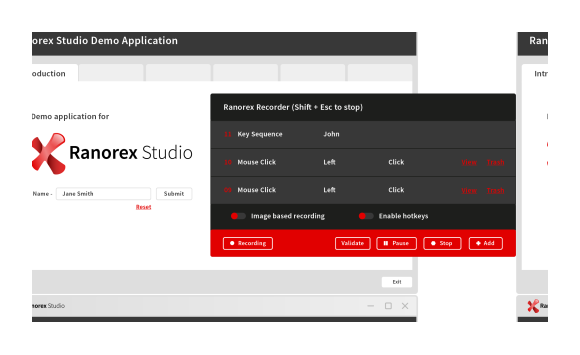
Ranorex covers the problem most DevOps testing tools ignore: teams that need to test desktop, web, and mobile applications without maintaining three separate toolchains. Ranorex Studio supports automation across common Windows desktop stacks like WinForms, WPF, Qt, and Java, plus many other desktop technologies.
Teams running Windows applications alongside web services often maintain separate toolchains: one for web, one for mobile, and one for desktop. Test assets live in different repos, use different approaches, and require different expertise.
With Ranorex Studio, teams can centralize UI automation in one environment:
- One object repository to manage UI elements and reuse them across modules.
- Low-code recording and visual test design, with the option to extend or fine-tune in C# or VB.NET when needed.
- CI/CD execution through Jenkins and Azure DevOps integrations, so runs and results show up in pipeline workflows.
For distributed execution, Ranorex Remote Agents support running tests on multiple machines, and agents lease a Runtime Floating License only while executing.
What sets Ranorex apart for DevOps teams
Self-healing tests with RanoreXPath
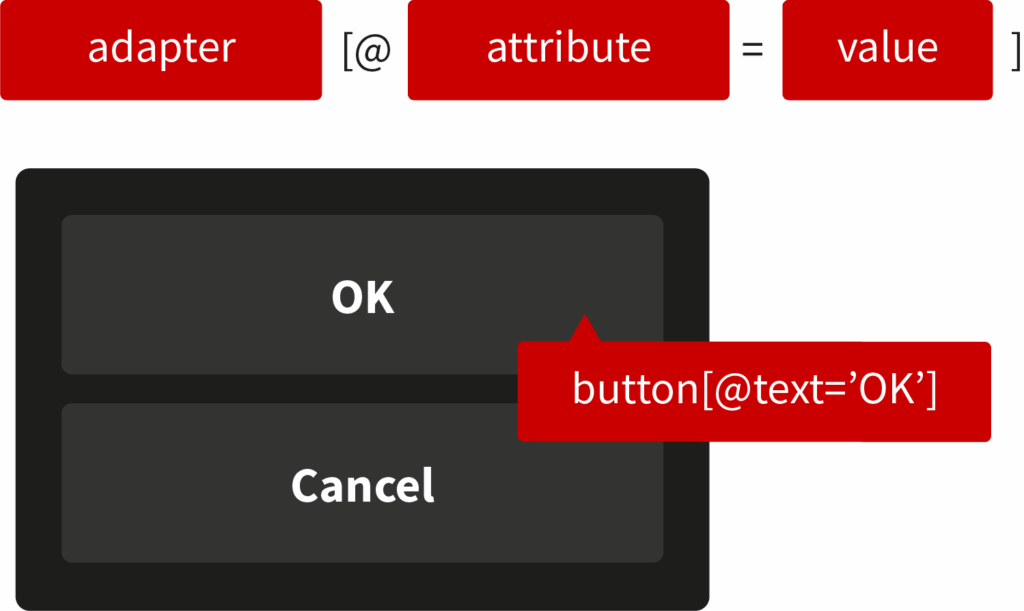
UI changes break most automation. Ranorex includes a self-healing mechanism that, when an element cannot be found, searches for the closest matching object to reduce failures caused by locator drift. It is enabled by default in new solutions created in Ranorex Studio 10.1.1 or later.
Under the hood, Ranorex also supports attribute weights and weight rules to prioritize stable attributes over dynamic ones when generating robust RanoreXPath expressions.
Hybrid codeless and full code approach
Manual testers can record and replay tests without coding. Automation engineers write C# or VB.NET scripts for complex scenarios. Both approaches use the same object repository and execution engine. QA analysts build smoke tests without touching code. Developers write data-driven frameworks in C#.
Native Jenkins and Azure DevOps integration
Ranorex provides official plugins for Jenkins and Azure DevOps. Test results appear in pipeline dashboards with detailed logs, screenshots, and videos. Parallel execution distributes tests across multiple agents for faster feedback.
Enterprise deployment options
Ranorex supports distributed testing through Remote Desktop, virtual machines, and remote test agents. License management accommodates floating licenses for shared test infrastructure or node-locked licenses for dedicated machines. This scales from small teams running local tests to enterprises managing hundreds of concurrent test executions.
Stop maintaining three toolchains for one pipeline
Every tool you add to your test stack is another integration to maintain, another language to support, and another dashboard nobody checks. Ranorex puts desktop, web, and mobile testing in one IDE with one object repository, plugged directly into Jenkins or Azure DevOps. Your tests share modules, your team shares a workflow, and your pipeline stays fast.
See what it looks like when your desktop, web, and mobile tests all run from the same place.
Start your free trial today!