This is the last part of a three-part blog post series covering test automation for manual testers without any programming background. This blog post deals with the opportunities that manual testers have in the automation category of “Analysis“. At the end, there is a conclusion of all three parts of the article.
If you haven’t read the first part and the second part regarding preparation and execution tasks, it’s recommended to do so prior to reading this section.
- Categories for Test Automation
- Adding Error-Handling in Your Testing Flow
- Knowing How to Step into Test Cases and Debug Tests
- Reading and Interpreting Report Results
- Conclusion
Categories for Test Automation
Below you’ll find a diagram with the three different areas for manual testers to consider when jumping into test automation: Preparation, Execution and Analysis. Within each of these categories, there are specific sections in which manual testers can make contributions right away. This blog post will cover the third category listed: “Analysis”.

Adding Error-Handling in Your Testing Flow
Test automation error-handling is different than manual testing in many regards. For example, here are some automation conditions that may have to be dealt with:
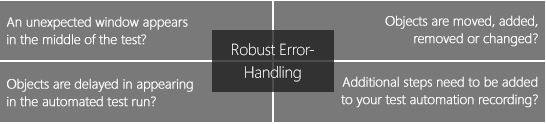
These factors should be at the forefront of automation preparation and error-handling for the functional test analyst.
Knowing how the automation will and should react to these situations will ensure that the tests generated are robust enough for future test execution runs.
Knowing How to Step into Test Cases and Debug Tests
Test automation test cases are similar to a manual test case in terms of documenting the step-by-step procedures. For most test cases, code is generated in the background. One key advantage of automation is the ability to step into a test case to see where an error has occurred or what application behavior is present. The following is a three-step process to enable such detection:

Set your breakpoint
Evaluate your test case and put a stopping point on a specified step. What this does is run the test up until that point; it does not proceed further until instructed to do so.
Choose the “Step” for the breakpoint
You want to select this after careful analysis because it is dependent on the state in which you want to see your application. Knowing this step is very important in driving the subsequent step in which the application displays an unexpected behavior from what you expected.
Execute the test case to the breakpoint
Once the breakpoint is hit, you have a few different options for further analysis:
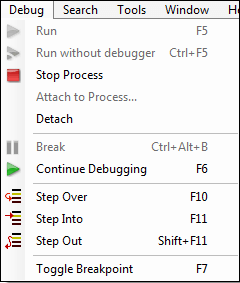
- Step over: stepping over the breakpoint to execute the next set of commands
- Step into: stepping into the current function to see if it runs as expected
- Step out: stepping out of the function entirely
Reading and Interpreting Report Results
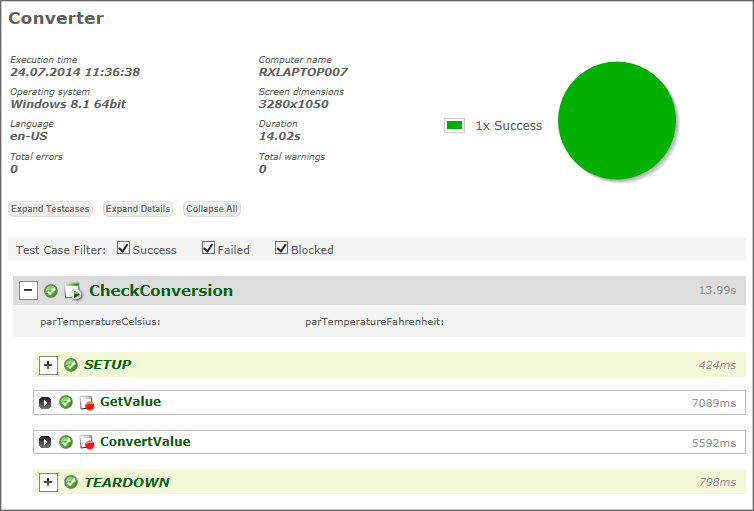
Test automation reports can be very informative and can produce much more information than a manual test case would have generated. The fact that this information is produced automatically makes it great for reviewing. Such information is now available to review within the automated test case execution run:
- Execution time
- Machine name
- Operating system
- Screen dimensions
- Language
- Duration
- Total errors
- Total warnings
- Global parameter values
- Location of the failed step
- Total number of iterations
Conclusion
Test automation has different requirements than those of traditional manual testing. Understanding object recognition and repositories, error-handling techniques, automation frameworks such as data-driven testing, as well as debugging and reporting are key elements in test automation that are not so prevalent with manual testing.
Knowing some of the aspects that go into the work of automation allows a manual tester to jump right in and help in the recording and playback. The industry trend has been moving more towards scriptless automation, so manual testers can make the transition easier. Familiarity with the application under test (AUT) is the largest hurdle, and most manual testers already have this covered.
All manual testers should be involved in some aspect of automation. Not only does it increase your knowledge of testing tools in the market – it also increases your value on the market as a tester!
Want to get a head start to GUI testing? Read our comprehensive GUI testing guide to learn more about major GUI testing types and techniques, as well as get insights into how to create a comprehensive GUI test plan and write GUI test cases.