
Have you ever been running a test suite session in Ranorex Studio, only to be greeted by unexpected warnings in your report? Warnings like ‘Out of Bounds’ or ‘Unbounded Module Variable’ can be puzzling and slow down your test automation if you’re unsure what to do or how to manage them.
This article looks at these two common warnings and provides clear insight on how to handle them. By understanding and effectively taking care of these warnings, you can ensure smoother, more reliable test automation workflows in Ranorex Studio. Read on, and let’s figure out these common warnings together and streamline your testing process.
Error 1: Out of Bounds Warning in Ranorex
When you are performing a mouse action on a UI element and the action spot of that mouse action was performed outside the boundaries of the assigned UI element, you will get the following warning in the report:
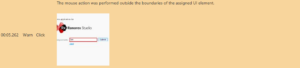
You may see this warning when working on different machines with different resolutions or zoom settings. To handle this warning, you can change the action spot of the action to Center. When the action spot is Center, the action will be performed in the middle of the element. That will help handle situations where element positions and sizes are changed due to different resolutions and display settings. It should also help in a progressive web app or any app that adjusts the layout according to screen resolution.
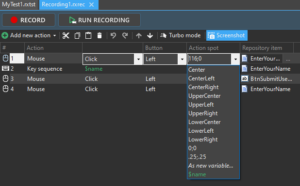
Changing the Action spot in the recording module itself allows you to fix the specific action. But you can also change the default recording behavior so future recordings default to Center as the action spot location. The setting that defines this default behavior is the Coordinate Recording Mode, which can be found under Settings -> Recorder Defaults. This setting has three possible values: Pixel, None, and Proportional. In this case, we want to use the None option so that Ranorex will also choose the center for the action spot location. You can read more about action spot settings here.
Warning 2: Unbounded Variables
When you have a variable being used inside a module that is not bound to a data source Ranorex will create a default warning.

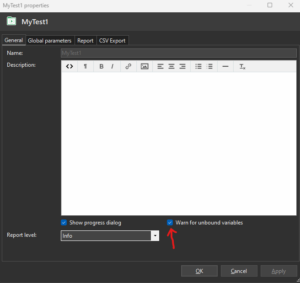
If you are using the variable in a way that does not require it to be bound (for getting a value and logging that value, for example) then you can easily disable the warning in the Test Suite properties. You can access the Test Suite properties by right-clicking the Test Suite and selecting “properties.”
Use Warnings to Your Advantage
Warnings are one of the most helpful pieces of information you’ll find in your reports. When you use that information to optimize your tests or relay important testing results to stakeholders, you can rest easy knowing that it’ll steer you toward a successful testing process (not to mention that handling the warnings can clean up your test reports). Try these steps to see for yourself.
Got a question about this topic or have an idea you’d like to see covered? Contact us and let us know your thoughts.


